The “Unknown at rule tailwind” error is one of those annoying little issues that almost every developer runs into at some point. You’re happily writing your CSS file with @tailwind base;, @tailwind components;, and @tailwind utilities;, or maybe using @apply for custom classes, and suddenly VS Code (or any editor) throws squiggly yellow lines everywhere with messages like:
- “Unknown at rule @tailwind.”
- “Unknown at rule @apply css(unknownAtRules)”
It looks like a syntax error, but your project builds just fine, Tailwind classes work in the browser, and everything runs smoothly. So what’s going on, and more importantly, how do you make it stop?
In this blog post, we’ll cover everything you need to know about this error, why it happens, and quick fixes. By the end, you’ll have a clean, warning-free Tailwind setup.
/tab
Table of Contents
What Is the “Unknown at-rule Tailwind” Error?
In CSS, things that start with @ are called at-rules, like:
@media
@supports
@import
// tailwind add its own custom ones
@tailwind base;
@tailwind components;
@tailwind utilities;
Tailwind CSS uses custom at-rules (like @tailwind , @apply, @layer, @screen, and in v4 things like @theme, @utility) that aren’t part of standard CSS. These are directives that PostCSS (Tailwind’s processor) understands and transforms into real CSS during your build.
If your editor, linter, or IDE doesn’t know about these custom rules, it flags them as “unknown.” It’s almost always just a false positive. Your code is correct, and Tailwind works perfectly.
Why Does “Unknown at rule @tailwind” error happen?
The “Unknown rule” warning in Tailwind CSS happens because Tailwind intentionally extends CSS beyond what standard CSS validators understand, and your editor or linter is checking the file before Tailwind ever gets a chance to process it.
There are three main culprits:
- Editor/Language Server: VS Code’s built-in CSS validator doesn’t recognize Tailwind-specific syntax out of the box.
- PostCSS Not Configured: Tailwind relies on PostCSS to process those at-rules. If the config is missing or broken, the build might still work (via framework magic), but warnings can appear.
- Linters: Tools like Stylelint, ESLint (with certain plugins), or Biome treat unknown at-rules as violations unless you tell them to ignore Tailwind’s directives.
Does Ignoring It Hurt Anything?
In most cases, ignoring Tailwind CSS “unknown rule” warnings does not negatively affect a project at runtime, as long as the build process completes successfully and styles are rendered correctly in the browser.
When it is safe to ignore Unknown at rule @tailwind
Ignoring these warnings is generally safe when:
- The application builds without errors,
- Tailwind styles are correctly generated and applied.
- The warnings originate from development tools rather than the build system.
In such cases, there is no impact on performance, bundle size, or production behavior.
When it can become a problem
Ignoring these warnings may become problematic if:
- The warnings are emitted by the build tool itself, indicating that Tailwind is not being processed correctly.
- Tooling noise hides genuine CSS errors, making debugging harder.
- The project relies on strict linting rules or CI pipelines that treat warnings as failures.
Special Mention: FlyonUI
Check out the FlyonUI – A Comprehensive Tailwind Component Library

Also available in the pro version. It includes
- 500+ Free & Pro Tailwind Blocks
- Tailwind Figma Design System
- Tailwind AI Builder MCP Server
- Tailwind Templates
- Tailwind IDE Extension
Ensuring PostCSS Processes Tailwind Correctly
Even if the editor is happy, make sure your build actually processes Tailwind.
Install Dependencies:
npm install -D tailwindcss postcss autoprefixerCreate/Update postcss.config.js (project root) For Tailwind v4+ (uses a different plugin):
module.exports = {
  plugins: {
    '@tailwindcss/postcss': {},
    autoprefixer: {},
  },
};
Also run npx tailwindcss init -p to generate both tailwind.config.js and postcss.config.js .
Quick Fixes
Here are the fixes that you can choose and apply to anyone from the listed solutions to fix this.
Option A: Change Language Mode
- Open your css file (e.g:
global.css) - Bottom-right corner of VS Code → click “CSS” (language mode).
- Select Tailwind CSS
Done! VS Code now treats the file with Tailwind-aware parsing.
Option B: Install the Official Extension (Recommended for Long-Term)
- Go to Extensions (
ctrl/cmd + shift + x) - Search for Tailwind CSS IntelliSense (by Tailwind Labs).
- Install it.
This gives you:
- Autocomplete for classes
- Hover previews
- Syntax highlighting for
@tailwind,@apply, etc. - No more unknown at-rule warnings
Option C: Associate .css Files with Tailwind Language
- Go to VS Code’s (or your code editor’s) settings.
- Search “Files associations.”
- Add items such as
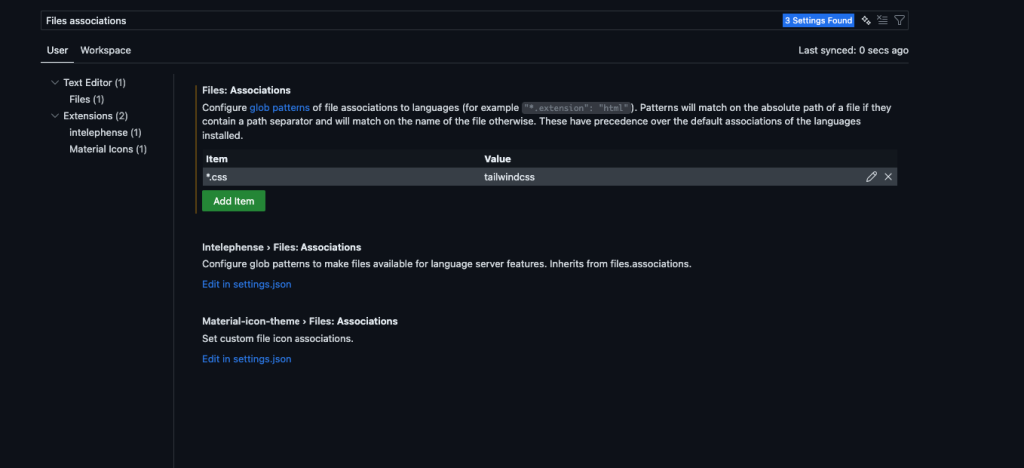
- Backup and sync the changes.
All set! Now warnings should be gone.
Additional Tips and Best Practices
- Restart VS Code (or your code editor) or dev server after changes.
- Keep dependencies updated: Tailwind v3 needs PostCSS 8+, v4 has different requirements.
- Use npx
tailwindcss --watchfor simple testing. - Avoid typos: It’s
@tailwind, not@tailwin. - If using other extensions (Prettier, etc.), ensure compatibility.
When the warning persists after these steps, an AI assistant can help trace whether PostCSS or the linter is the actual source. Pick from the best llm for coding for this – stronger models recognise framework-specific at-rules and won’t try to rewrite valid @tailwind directives as errors.
Conclusion
The “unknown at-rule” error in Tailwind CSS is frustrating but totally fixable. Most of the time, it’s just VS Code not knowing about Tailwind’s custom syntax. Simply install the Tailwind CSS IntelliSense extension, associate files, or switch language mode, and you’re golden.
For a valid setup, always configure postcss.config.js properly and get your linters under control with Tailwind-aware rules. Once set up, you can focus on building beautiful UIs without those distracting squiggles.